Vertex Filter - By UV Tile
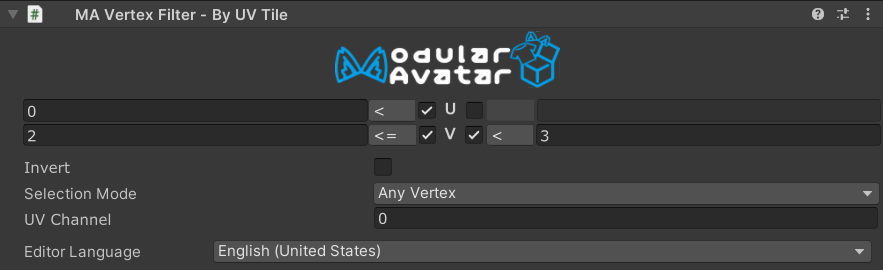
Vertex Filter - By UV Tile is a Vertex Filter component which, in combination with Mesh Cutter, allows you to
select portions of a mesh to delete or hide, based on whether their UV coordinates fall within a specified rectangular
region.
When should I use it?
Vertex Filter - By UV Tile is useful when you want to select specific regions of a mesh based on texture space
coordinates. Common use cases include:
- Selecting individual tiles on a UV tile / UDIM texture layout
- Removing portions of a mesh that occupy a specific area of the UV map
- Selecting visible areas of a mesh when combined with other vertex filters in intersect mode
When shouldn't I use it?
If your UV coordinates repeat (for example, mirrored UVs on the left and right side of a mesh), a By UV Tile filter
will select both the left and right regions simultaneously. In this case, consider using By Axis to
distinguish between the two sides.
Setting up Vertex Filter - By UV Tile
Vertex Filter - By UV Tile must be attached to a GameObject with a Mesh Cutter component. You can add it by
clicking the "Add Vertex Filter" button on the Mesh Cutter component, or by adding a Vertex Filter - By UV Tile
component manually.
Configuration
For each UV coordinate (U and V), you can set lower and upper bounds to define the rectangular selection region. Each bound has three controls:
- Enable toggle — enables or disables the bound. Disabled bounds are ignored, letting you filter on only U, only V, or both axes.
- Operator — selects whether the bound is strict (
<) or inclusive (<=). A strict bound excludes vertices exactly on the boundary value; an inclusive bound includes them. - Value — the coordinate value of the bound.
The left bound acts as a minimum (vertices with U below this value are excluded), and the right bound acts as a maximum (vertices with U above this value are excluded).
| Field | Description |
|---|---|
| UV Channel | The UV set to use (0–7). Defaults to channel 0 (the first UV set). |
| Selection Mode | Controls how vertex selection translates to primitive (triangle) selection. See below. |
| Invert | When checked, selects vertices outside the specified rectangle instead of inside. |
Selection Modes
The Selection Mode field controls how the filter decides whether a triangle (or other primitive) is selected:
- Any Vertex — the primitive is selected if at least one of its vertices falls within the defined UV rectangle.
- All Vertices — the primitive is selected only if all of its vertices fall within the rectangle.
- Centroid — the primitive is selected based on the UV coordinate at its center. This is the most predictable mode for UV-based filtering and works well for tile-based selections.
How it works
The filter examines the UV coordinates of each vertex (or centroid, depending on the selection mode). When all bounds are enabled, a vertex is inside the rectangle if:
UMin < U < UMax  and  VMin < V < VMax       (all operators set to strict `<`)
UMin ≤ U ≤ UMax  and  VMin ≤ V ≤ VMax       (all operators set to inclusive `≤`)
The same formula applies when mixing strict and inclusive bounds — the inequality at each bound is determined by its individual operator.
When you check Invert, the selection is flipped: vertices outside the rectangle are selected instead.
UV Channel support
If your mesh has multiple UV channels, you can use the UV Channel field to select which UV set the filter operates on. The default channel 0 corresponds to the main texture coordinates.