Outfit Root
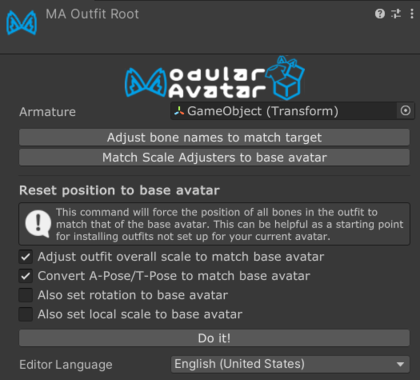
The Outfit Root component identifies the root GameObject of an outfit.
What is Outfit Root?
Setup Outfit automatically adds Outfit Root to the selected outfit object and assigns its Armature Root. You normally do not need to add or configure this component manually.
If you run Setup Outfit on an outfit that was set up using a prior version of Modular Avatar, it'll also add an Outfit Root component for you.
If you add Outfit Root manually, set Armature Root to the root Transform of the outfit's main bone hierarchy.
Outfit Root doesn't do anything directly itself; it's intended to provide convenient access to otherwise-buried options, and to provide a marker for other tools to work with.
Outfit adjustment tools
The Outfit Root inspector provides convenient access to options to adjust the outfit fit:
- Adjust bone names to match target attempts to rename the outfit's bones to match the base avatar.
- Reset position to base avatar moves corresponding outfit bones to the base avatar's bone positions for every Merge Armature under the Armature Root. Its options can also convert between A-pose and T-pose, adjust the outfit's overall scale, and copy bone rotations or local scales.
- Match Scale Adjusters to base avatar adds, updates, or removes Scale Adjuster components on matching outfit bones to mirror the base avatar.